Available for Mac & Windows

Books, tenants and a Schedule E report for your rentals, in one app that keeps every record on your own computer.

A rental bookkeeping app for landlords and a portfolio tracker for investors. Your portfolio. Your device. Your privacy.

For Mac and Windows. From $179 a year. 30-day money-back guarantee.

Schedule E and T776 built in
Encrypted local vault
Runs on your Mac or PC

Dear landlord,

If you own one to three rentals and keep your own books, here is a way to have your Schedule E ready before tax season starts... and keep every number on the computer on your desk.

Here is how it works.

Most landlords start with a spreadsheet. One tab for rent. One for repairs. One for the mortgage. Maybe a folder of receipts photographed on your phone.

It holds up fine all year. Then January comes, and you are matching receipts to properties, working out depreciation by hand, and moving totals onto Schedule E one line at a time.

So you look at the free online tools. They do the bookkeeping well. They also keep your property addresses, mortgage balances, rents and tax records in an account on their servers.

SealedFolio does the same job on your own computer.

You add a property. You record rent and expenses, or bring bank transactions in through Plaid, using your own Plaid account keys, when you want to. You add tenants, leases and mortgages. Drop in a receipt, a tax bill or a lease, and the AI model running on your computer reads it and fills in the fields for you.

At tax time you open Reports and run Schedule E, or T776 if you file in Canada. Depreciation is worked out for you per property, on the 27.5 or 39 year schedule. You export the report as a PDF or CSV and hand it to your accountant, or type it into your tax software yourself.

And the whole time, your books sit in an encrypted vault on your Mac or PC, opened by a master password that only you know.

The rest of this page shows you the problems it was built to fix, what it looks like running, every feature in it, exactly how your data is handled, what it costs, and the guarantee that lets you try it for a full month on our money.
Every landlord eventually hits this wall

Landlords who outgrow a spreadsheet, a free tool or general accounting software keep running into the same problems. Here are nine of them, with what SealedFolio does about each one.

Stessa

Bank feeds fail. Reconciling is a nightmare. And the mobile app is garbage.

You choose how transactions come in: Plaid bank import on either plan with your own Plaid keys, or OFX, QFX, CSV and QIF files on Portfolio. You review every row before it lands in your books.

Baselane

Baselane is fine until you need real reporting. Then you're back in Excel.

SealedFolio builds Schedule E, T776, income statement, balance sheet, general ledger, cash flow and rent roll reports on your computer. Portfolio adds CapEx, budgets and scenarios.

QuickBooks

QuickBooks is too general. It doesn't understand properties, units, or tenants.

SealedFolio is built around rentals. Every transaction ties to a property, and the rental categories feed your Schedule E and T776 lines.

Spreadsheets

I've been managing 12 doors in Google Sheets for 3 years. It works until tax season, then it's hell.

Your rent, expenses and mortgages live in one place, already sorted by property and category. On Portfolio you can import your old spreadsheet as a CSV file and keep going from there.

Stessa

Stessa was free and fine until Roofstock bought them. Now I don't trust where my data goes.

Your records stay in an encrypted vault on your own computer. The vault opens with your master password, which we never see.

Cost

Software costs that are hard to add up, with add-ons and payment fees spread across the year.

Two prices, shown in full. Pro is $19 a month or $179 a year. Portfolio is $39 a month or $297 a year. SealedFolio records rent payments and leaves the money handling to you, so there is nothing else to pay.

Spreadsheets

One formula error in my depreciation schedule and I filed wrong for two years.

SealedFolio works out straight-line depreciation for each property over 27.5 years for residential or 39 for commercial, with the land value taken out. There are no formulas for you to maintain.

QuickBooks

I spent three weekends setting up classes and locations in QuickBooks. Still doesn't feel right.

Open SealedFolio, add a property and start recording. The rental categories are already there.

Offline

I just want something that works offline when I'm at a property with bad cell service.

SealedFolio is a native Mac and Windows app. Your books, reports, tenants and documents open and work offline.

See it working

Here is what that looks like

Below, a sample property tax bill goes into SealedFolio. The AI model on the computer reads it and fills in the fields. Then watch the short demo: documents, rent roll, tenant ledgers and Schedule E, all in the encrypted vault.

Drop in a document. The local AI extracts every field.From the SealedFolio demo, shown with a sample document. Document scanning runs on your device after a one-time model download.

â–· Watch the full demo

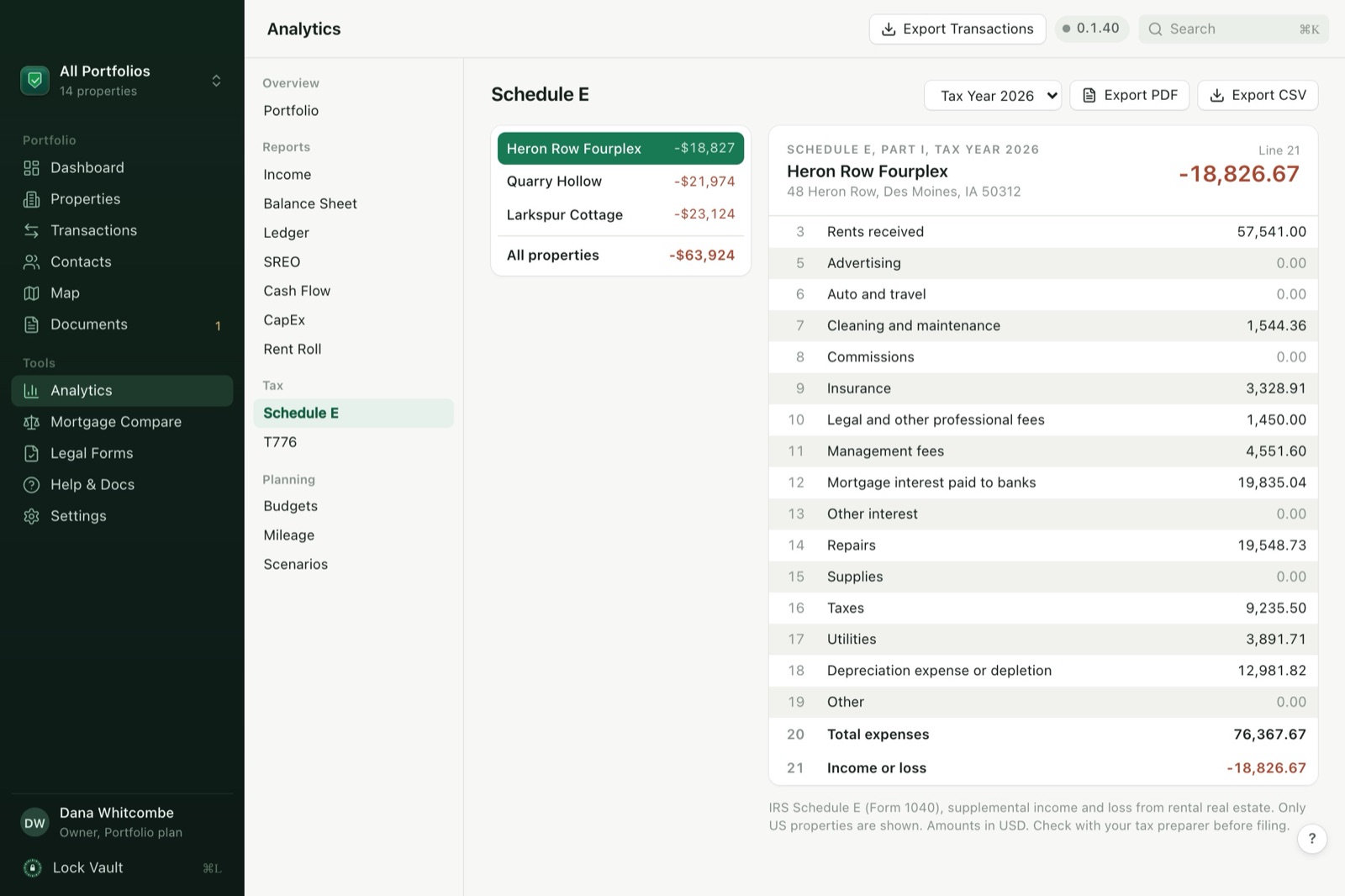
SealedFolio Analytics, Schedule E tab for a sample fourplex: lines 3 to 21 filled in, from rents received to depreciation and the income or loss total
Sample data The Schedule E screen in SealedFolio, filled from a fictional sample portfolio. Look at line 18: depreciation comes in from the property's purchase price and land value, and line 21 totals the year for that property.

Your portfolio runs on your machine

Books, tenants, documents, analytics and tax reports in one desktop app. Everything is stored on your computer, and the optional online features are listed in full under Privacy below.

Encrypted Local Vault

Your database is protected by SQLCipher. Documents get per-file XChaCha20-Poly1305 encryption. Argon2id key derivation. Decrypted only in memory, on demand.

AI Document Scanning

Drop in a mortgage document, tax bill, lease or receipt, and the local AI extracts the fields for you. The model runs on your device after a one-time download, and your documents stay on your computer.

Full Portfolio Analytics

ROI, cap rate, cash-on-cash return, equity tracking, cash flow analysis, occupancy rates, and portfolio snapshots, calculated locally across your entire portfolio.

Tenant & Rent Management

Full tenant profiles, lease tracking, rent collection with payment history, per-tenant ledgers, portfolio-wide rent roll reports, and vacancy management.

Tax-Ready Reports

Generate Schedule E (US), T776 (Canada), income statements, balance sheets, general ledger, and cash flow reports. Export everything to CSV.

Team Shared Access

Multi-profile system with role-based permissions. Owners have full control, managers can read and write, viewers are read-only. Profile selector when you open the vault.

The complete feature set

Every feature in the app today, all running on your own computer.

Portfolio Management

Up to 3 properties on Pro, unlimited on Portfolio, single family, multi-family, condo, townhouse, commercial, land
Valuation history tracking, appreciation over time
Multi-unit management, units with individual rent, beds, baths, sqft
Property archiving, hide sold/inactive properties
Encrypted photo gallery, per-image encryption
Drag-and-drop portfolio reordering
Command palette search, find any property, contact or transaction from the keyboard
Interactive property map, pins, cash flow visualization, geocoding
Portfolio health score, A-F grade from occupancy, cash flow, maintenance and lease coverage

Financial Tracking

Income & expense tracking, categorized with auto-rules
Recurring transactions, weekly, monthly, quarterly, yearly
CSV, OFX, QFX, QIF import, with column mapping wizard, Portfolio plan
Transaction splits, split one payment across categories
Tax-deductible flagging, filter deductible expenses
Custom tags & auto-categorization rules, custom tags on the Portfolio plan
Mileage tracking, log trips for tax deductions
Budgets & budget vs. actual analysis, Portfolio plan
Plaid bank import, optional, connected with your own Plaid keys

Mortgages & Financing

Multiple mortgages per property, lender, rate, term, balance
Amortization schedules, full principal/interest breakdown
Mortgage and refinance comparison, up to 3 scenarios side by side
Escrow tracking, taxes & insurance escrow amounts

Tenant & Rental Operations

Full tenant profiles, contact info, lease dates, rent, deposit, employer
Rent payment recording, cash, check, ACH, payment app, instant bank transfer
Per-tenant ledger, monthly charges, payments, running balance
Portfolio-wide rent roll report, all tenants across all properties
Vacancy tracking, occupancy rates, vacant unit monitoring
Expiring lease alerts, 30-day dashboard notifications
Rental listing writer, write a vacancy listing, preview it and copy it to post
Tenant status tracking, active, notice, eviction, past
Automatic rent charge generation, monthly charges created per tenant
Late fee automation, configurable amount, percent, grace period

Property Operations

Work orders & maintenance tracking, priority, status, costs
CapEx project management, budgeted vs. actual spending, Portfolio plan
Insurance policy tracking, expiration alerts, coverage, deductibles
Service provider contacts, by trade: plumber, electrician, HVAC, attorney, accountant and more
Legal form templates, leases, notices, addendums, checklists
Encrypted document vault, upload, view, scan any file type
Camera capture, snap receipts and documents directly from your camera
Receipt matching, scanned receipts matched to transactions by amount and date

Analytics & Reports

Portfolio dashboard, total value, income, cash flow, occupancy
Schedule E (US) & T776 (Canada) tax reports
Income statement & balance sheet
General ledger & cash flow reports
ROI metrics, cap rate, cash-on-cash, total return
Equity timeline & portfolio snapshots
CapEx reports, budgeted vs. actual by property, Portfolio plan
What-if scenario analysis, model investment scenarios, Portfolio plan
CSV export for all reports
Rent roll report with collection rate
Depreciation schedules, straight line over 27.5 or 39 years, land value excluded
PDF & CSV export, Schedule E, T776, and all reports

Security & Team Access

SQLCipher database encryption, local encrypted vault
XChaCha20-Poly1305 per-file encryption
Argon2id key derivation, 64MB memory, brute-force resistant
Multi-profile shared access, owner, manager, viewer roles
Vault lock and open, lock database, clear keys from memory
Encrypted backups & restore
Recovery key, shown once at setup, opens the vault if you forget your password
Password change with database re-keying
Audit log, full history of all changes with timestamps
Cloud sync backup, optional encrypted backup to an iCloud Drive, Dropbox, Google Drive or OneDrive folder
The Privacy Moat

We can't see your data.
Because we never have it.

SealedFolio is a native desktop app for Mac and Windows. Your properties, tenants, transactions and documents live in an encrypted vault on your own computer. The vault opens with a key made from your master password, and that password stays with you. License checks send our server your license key and a hashed fingerprint of the computer, plus the computer's name on first activation.

The app goes online for these features, and each one runs only when you use it:

  • License check, to confirm your key.
  • Plaid bank import, when you connect a bank account.
  • Map pins, which send a property address to OpenStreetMap to place it on the map.
  • Document scanning model, a one-time download. Scanning itself then runs offline.
  • Update checks, so you hear about new versions.
  • Sample photos, if you load the sample portfolio.
  • Encrypted backups, if you point them at an iCloud Drive, Dropbox, Google Drive or OneDrive folder.

SQLCipher database encryption

Your local database is encrypted at rest and opened with your master password

XChaCha20-Poly1305 per-file encryption

Each document and photo gets a unique key. Compromising one file can't compromise another.

Argon2id key derivation (memory-hard)

64MB memory cost, 3 iterations. Brute-force resistant by design.

Local AI, no external AI API calls

Document scanning runs on your device after any optional model download.

Keys wiped from memory

Encryption keys are zeroed out of memory when they are no longer needed and when you lock the vault

How Your Data Flows

Your Master Password

Never stored. Never transmitted.

Argon2id Key Derivation

64MB memory, 3 iterations, 4 threads

Database

SQLCipher
Local vault

Documents

XChaCha20
Per-file keys

Photos

XChaCha20
Per-image

Encrypted on Your Device

Decrypted only in memory, on demand

Comparing it with what you use now?

Each comparison has its own page, so every rival's features can be checked and dated on one screen.

Why SealedFolio costs money

SealedFolio is sold as a paid Pro or Portfolio subscription, and that subscription pays for the app. The desktop app sends no usage analytics, and we run no cloud database for your properties, tenants or documents. So the app has one job: keep your books in good order, on your own computer.

Which plan is yours

Pro, if you own 1 to 3 rentals. Portfolio, if you own more, or want to import years of history from files. Every SealedFolio plan is paid at checkout and your first purchase includes a 30-day money-back guarantee. No free trial. Your license key and download links are on the page that opens after checkout.

Pro

$179/yr

Works out to $14.92 a month, $49 less than 12 months at $19.

  • Up to 3 properties
  • Schedule E and T776 tax reports, PDF and CSV
  • Books, mortgages, tenants, work orders
  • On-device document scan
  • Plaid bank import with your own Plaid keys
  • Activate on 2 computers
Buy Pro

$179/yr, charged today. 30-day money-back guarantee.

or buy monthly for $19/month

Portfolio

$297/yr

Works out to $24.75 a month, $171 less than 12 months at $39.

  • Unlimited properties
  • Everything in Pro
  • Bulk file import: CSV, OFX, QFX and QIF
  • Custom tags and advanced analytics: CapEx, budgets, scenarios
  • Activate on 3 computers, Pro allows 2
  • Priority feature requests
Buy Portfolio

$297/yr, charged today. 30-day money-back guarantee.

or buy monthly for $39/month

Use it for a full month. Then decide.

Your first payment comes with a 30-day money-back guarantee.

Set up your properties. Record a month of rent and repairs. Scan a few receipts. Run the Schedule E report and look at it.

If SealedFolio is not for you, email [email protected] within 30 days of that first payment, from the email address you bought with, and we refund it in full. The refund also cancels future renewals and ends the license. The full wording is in our terms.

Here is exactly what to do

  1. 1

    Click Buy SealedFolio below and pick Pro or Portfolio, yearly or monthly.

  2. 2

    Pay at checkout. The download page opens with your license key on it. The same key arrives by email from [email protected] within a few minutes.

  3. 3

    Download SealedFolio for Mac or Windows from that page and install it.

  4. 4

    Open it and set your master password. Save the recovery key it shows you somewhere safe, such as a password manager.

  5. 5

    Open Settings, License and paste your key. Then add your first property and record this month's rent.

Buy SealedFolio

The 2026 tax year closes on December 31. Start now, and you have the rest of the year to get this year's rent and expenses into one place before you file.

Thank you for reading this far.

P.S. Pro is $179 a year for up to 3 rentals, with Schedule E and T776 built in and every record kept on your own computer. Click Buy SealedFolio, pay at checkout, and your key is waiting on the download page. Your first payment carries a 30-day money-back guarantee, so you can run a full month of books, Schedule E included, before you decide.

Buy SealedFolio

Frequently asked questions

Is my data really private? How can I verify?
Yes. SealedFolio is a native desktop app, not a web app with a hosted portfolio database. Your database and documents are encrypted and stored on your device. You can verify network behavior yourself with Little Snitch or Wireshark: core ledger, reporting, and document workflows do not upload portfolio data to SealedFolio servers. Network calls occur only for license validation and optional features you use, such as Plaid bank import, map/geocoding views, model downloads, update checks, sample media, and encrypted backup copies to a folder you choose.
What happens if I forget my master password?
Use the recovery key SealedFolio showed you during setup. On the unlock screen, choose the recovery key option and paste it in. We hold neither your password nor your recovery key, so keep both somewhere safe, such as a password manager or a safe.
How does AI document scanning work without the cloud?
SealedFolio runs a private AI model directly on your computer. When you scan a document, a mortgage, lease, tax bill, or receipt, the AI reads it locally and extracts structured data (dates, amounts, parties, terms) without any network call. Your documents never leave your device.
Does it work offline?
The core app works offline: your portfolio, analytics, document scanning, tax reports, tenant management, imports, and exports run locally. Internet is needed for license validation and optional network features such as Plaid bank import, map/geocoding views, model downloads, sample media, update checks, and cloud-synced backup folders.
Can I import data from Stessa or other tools?
Yes. Bulk file import of CSV, OFX, QFX, and QIF with a column mapping wizard is on the Portfolio plan. Pro brings transactions in with optional Plaid bank import when you provide Plaid credentials. Your data is stored in the encrypted local vault after import.
Can multiple people access the same portfolio?
Yes. SealedFolio supports multi-profile shared access with role-based permissions. Create profiles for team members with owner (full access), manager (read/write), or viewer (read-only) roles. Each person selects their profile when opening the vault.
What reports can I generate for tax season?
SealedFolio generates Schedule E (US) and T776 (Canada) tax reports, income statements, balance sheets, general ledger reports, cash flow statements, rent roll reports, CapEx reports, and mileage summaries. All exportable to CSV. You can flag expenses as tax-deductible and filter by deductibility at report time.

Free calculators, no signup

Run the numbers before you buy. The maths runs in your browser, so the figures you type are never sent to us.

Selling a rental to trade up? Price what a 1031 exchange would defer before you list it. Tracking a whole portfolio rather than a single deal? See local property management software, or the breakdown for landlords and commercial owners.