Commercial guide

Commercial Lease Stacking Plan Software
What It Shows and How to Build One

A stacking plan turns a rent roll into a picture of the building: every floor, every suite, who is in it and when they can leave. Here is what one should show, the kinds of software that draw them, and how a small owner can build one from data they already keep.

What a stacking plan shows

A stacking plan draws the building as a stack of floors, top floor on top. Each floor is split into suites in proportion to their square footage. Each suite carries four labels: suite number, tenant, square feet and lease expiry. Vacant space is shown in grey.

The useful part is the colour. Shade every suite by the year its lease ends and the rollover profile appears without a calculation: a building where a third of the floor area turns red for the same year has a refinancing and leasing problem that year, however healthy today's occupancy looks. Lenders, buyers and brokers ask for a stacking plan for exactly that reason.

A good stacking plan also states the totals that matter: rentable square feet, leased square feet, occupancy, and the share of leased area expiring in each of the next five years.

The kinds of software that draw stacking plans

TypeWho it is forHow the plan is made
Leasing platformsBrokers and institutional landlords running many buildingsDrawn automatically from the deal and lease records
Asset and lease administration systemsOwners with a lease admin team and abstracted leasesGenerated from abstracted lease data, often with critical dates
Spreadsheet templateOwners of one to a few buildingsBuilt from the rent roll with conditional colours by expiry year
Rent roll plus a diagram toolOwners who already keep a clean rent rollExport the rent roll, draw floors in any diagram app

Platforms are worth their price when you have dozens of suites and a leasing team that updates them daily. For one office or retail building, the hard part is not the drawing; it is keeping accurate lease data. That is the job the rest of this guide focuses on. How the lease records themselves are kept is covered in our commercial lease tracking software guide.

Worked example: a 3-floor, 24,000 square foot office
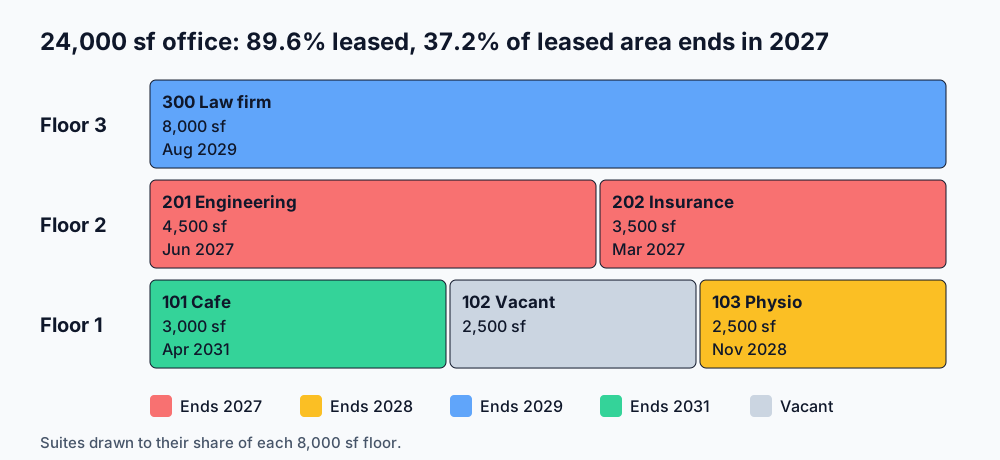
Stacking plan of a 3-floor 24,000 square foot office building: floor 3 a single 8,000 square foot law firm lease to 2029, floor 2 two suites expiring in 2027, floor 1 a cafe to 2031, a vacant suite and a suite to 2028
Suites drawn to their share of each 8,000 square foot floor and coloured by expiry year.
FloorSuiteTenantSq ftLease ends
3300Law firm8,000Aug 2029
2201Engineering office4,500Jun 2027
2202Insurance agency3,500Mar 2027
1101Cafe3,000Apr 2031
1102Vacant2,500
1103Physiotherapy clinic2,500Nov 2028
  1. Occupancy. 21,500 of 24,000 square feet is leased, 89.6%.
  2. Rollover. Suites 201 and 202 both end in 2027: 8,000 square feet, 37.2% of the leased area and the whole of floor 2, inside four months of each other.
  3. What the picture says. Floor 2 is the risk. Start renewal talks with both tenants in 2026, and if the loan matures in 2027, raise it with the lender now rather than at maturity.
  4. What it does not say. Rent per square foot and renewal options. Keep those in the rent roll; the stacking plan is the summary, not the record.

To see what the floor 2 rollover does to value, run the building through the commercial real estate valuation guide with and without those two leases.

Where SealedFolio fits

SealedFolio does not draw stacking plans. It keeps the data one is built from: each property's units with their square footage, and each tenant with unit, rent and lease start and end dates, stored encrypted on your own computer. The rent roll CSV export lists each active tenant with unit, lease start, lease end and monthly rent; add each unit's square footage from its unit record. The export leaves out units with no tenant, so check it against the property's full unit list and add the vacant suites before you work out occupancy. In the example above, suite 102 and its 2,500 sf would otherwise be missing.

For owners of one to a few commercial buildings, that is usually the right split: accurate lease records in the books, and a stacking plan drawn from them once a quarter. See the offline rent roll and how SealedFolio serves commercial owners.

Keep the lease data a stacking plan needs

SealedFolio Pro is $19 a month or $179 a year for up to 3 properties. Portfolio is $39 a month or $297 a year for unlimited properties. Both come with a 30-day money-back guarantee.

See SealedFolio pricing

Lease stacking plans: frequently asked questions

What is a stacking plan in commercial real estate?

A stacking plan is a floor-by-floor picture of a building, with each suite drawn to its share of the floor and labelled with the tenant, square footage and lease expiry. Colouring suites by expiry year shows lease rollover risk at a glance.

What software creates stacking plans?

Leasing and asset management platforms built for brokers and institutional owners draw stacking plans automatically from their lease data. Smaller owners usually build one in a spreadsheet from the rent roll.

Does SealedFolio draw stacking plans?

No. SealedFolio stores the inputs a stacking plan needs, units with square footage and tenants with lease end dates, and exports a rent roll. The drawing itself is done in a spreadsheet or a dedicated platform.

How often should a stacking plan be updated?

Whenever a lease is signed, renewed or ends, and at least once a quarter alongside the rent roll, because a stale stacking plan understates rollover.